AgentStepper: Interactive Debugging of Software Development Agents
作者: Robert Hutter, Michael Pradel
分类: cs.SE, cs.AI
发布日期: 2026-02-06
💡 一句话要点
AgentStepper:用于软件开发Agent交互式调试的工具
🎯 匹配领域: 支柱九:具身大模型 (Embodied Foundation Models)
关键词: 软件开发Agent LLM调试 交互式调试 软件工程 代码调试 AgentStepper
📋 核心要点
- 现有软件开发Agent难以调试,因为缺乏对LLM查询、工具调用和代码修改过程的可视化和控制。
- AgentStepper通过提供交互式调试功能,允许开发者检查、控制和操作Agent轨迹,从而简化调试过程。
- 实验表明,AgentStepper能有效提高开发者理解Agent行为和识别错误的能力,并显著降低调试过程中的挫败感。
📝 摘要(中文)
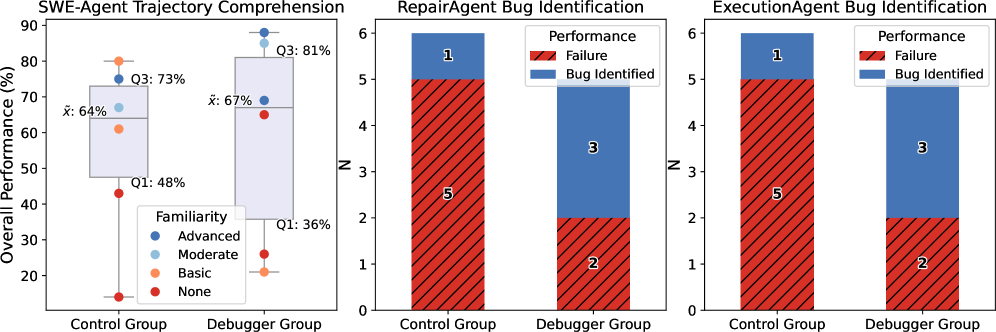
基于大型语言模型(LLM)的软件开发Agent在自动化环境设置、问题解决和程序修复等任务中展现出巨大潜力。然而,由于其复杂性和动态性,理解和调试此类Agent仍然具有挑战性。开发者必须推断LLM查询、工具调用和代码修改的轨迹,但现有技术很少以易于理解的格式揭示这些中间过程。本文的关键见解是,调试软件开发Agent与传统软件程序调试有许多相似之处,但需要更高层次的抽象,将级别从低级实现细节提升到高级Agent动作。基于此,我们推出了AgentStepper,这是第一个基于LLM的软件工程Agent的交互式调试器。AgentStepper使开发者能够检查、控制和交互式地操作Agent轨迹。AgentStepper将轨迹表示为LLM、Agent程序和工具之间的结构化对话。它支持断点、逐步执行和实时编辑提示和工具调用,同时捕获和显示中间存储库级别的代码更改。我们的评估将AgentStepper应用于三个最先进的软件开发Agent:ExecutionAgent、SWE-Agent和RepairAgent,结果表明,将该方法集成到现有Agent中只需要少量代码更改(39-42行)。此外,我们报告了一项包含12名参与者的用户研究,表明与传统工具相比,AgentStepper提高了参与者解释轨迹(平均性能从64%提高到67%)和识别Agent实现中的错误(成功率从17%提高到60%)的能力,同时降低了感知工作量(例如,挫败感从5.4/7.0降低到2.4/7.0)。
🔬 方法详解
问题定义:当前基于LLM的软件开发Agent在自动化软件工程任务中展现出潜力,但其内部运作复杂,难以理解和调试。开发者需要理解LLM的查询、工具调用以及代码修改的轨迹,而现有工具无法提供足够清晰和可控的调试手段,导致调试效率低下,开发者体验不佳。
核心思路:AgentStepper的核心思路是将软件开发Agent的调试过程类比于传统软件的调试,但需要更高层次的抽象。它将Agent的执行轨迹视为LLM、Agent程序和工具之间的结构化对话,并提供交互式调试功能,允许开发者逐步执行、设置断点、实时编辑提示和工具调用,从而深入理解Agent的行为。
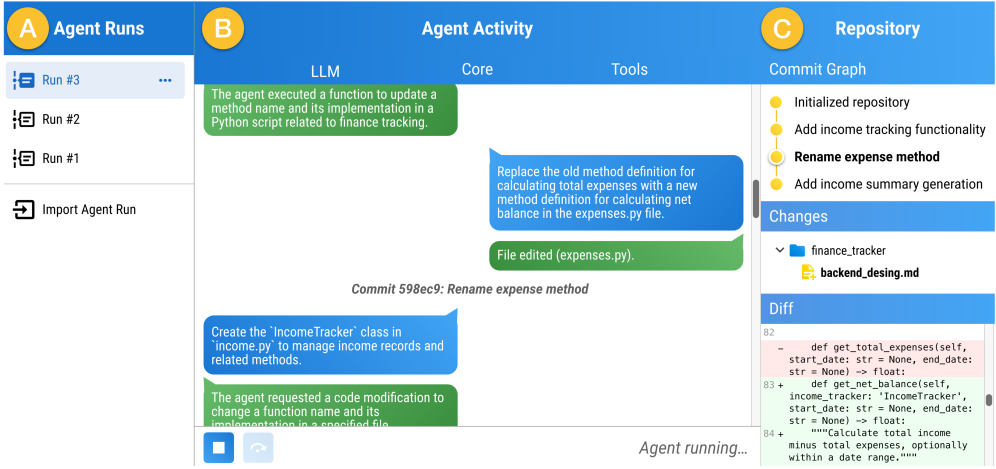
技术框架:AgentStepper的技术框架主要包含以下几个模块:1) 轨迹记录模块:负责记录Agent执行过程中的所有关键信息,包括LLM查询、工具调用、代码修改等。2) 交互式调试界面:提供断点设置、单步执行、变量查看等功能,允许开发者控制Agent的执行流程。3) 轨迹可视化模块:将Agent的执行轨迹以结构化对话的形式呈现,方便开发者理解Agent的行为。4) 实时编辑模块:允许开发者在调试过程中实时修改LLM提示和工具调用,从而观察修改对Agent行为的影响。
关键创新:AgentStepper最重要的技术创新在于其交互式调试方法,它将传统软件调试的理念引入到LLM驱动的软件开发Agent的调试中,并针对Agent的特点进行了优化。与现有方法相比,AgentStepper提供了更细粒度的控制和更直观的可视化,使开发者能够更有效地理解和调试Agent。
关键设计:AgentStepper的关键设计包括:1) 轨迹表示:将Agent轨迹表示为LLM、Agent程序和工具之间的结构化对话,方便开发者理解Agent的行为。2) 交互式调试界面:提供断点设置、单步执行、变量查看等功能,允许开发者控制Agent的执行流程。3) 实时编辑功能:允许开发者在调试过程中实时修改LLM提示和工具调用,从而观察修改对Agent行为的影响。
🖼️ 关键图片

📊 实验亮点
AgentStepper在三个最先进的软件开发Agent(ExecutionAgent、SWE-Agent和RepairAgent)上的集成仅需少量代码修改(39-42行)。用户研究表明,与传统工具相比,AgentStepper显著提高了参与者解释Agent轨迹的能力(平均性能从64%提高到67%)和识别Agent实现中的错误的能力(成功率从17%提高到60%),同时降低了感知工作量(例如,挫败感从5.4/7.0降低到2.4/7.0)。
🎯 应用场景
AgentStepper可应用于各种基于LLM的软件开发Agent的调试和优化,例如代码生成、程序修复、漏洞检测等。它能够帮助开发者更深入地理解Agent的行为,快速定位和修复错误,从而提高Agent的性能和可靠性。该工具的出现有望加速LLM在软件工程领域的应用。
📄 摘要(原文)
Software development agents powered by large language models (LLMs) have shown great promise in automating tasks like environment setup, issue solving, and program repair. Unfortunately, understanding and debugging such agents remain challenging due to their complex and dynamic nature. Developers must reason about trajectories of LLM queries, tool calls, and code modifications, but current techniques reveal little of this intermediate process in a comprehensible format. The key insight of this paper is that debugging software development agents shares many similarities with conventional debugging of software programs, yet requires a higher level of abstraction that raises the level from low-level implementation details to high-level agent actions. Drawing on this insight, we introduce AgentStepper, the first interactive debugger for LLM-based software engineering agents. AgentStepper enables developers to inspect, control, and interactively manipulate agent trajectories. AgentStepper represents trajectories as structured conversations among an LLM, the agent program, and tools. It supports breakpoints, stepwise execution, and live editing of prompts and tool invocations, while capturing and displaying intermediate repository-level code changes. Our evaluation applies AgentStepper to three state-of-the-art software development agents, ExecutionAgent, SWE-Agent, and RepairAgent, showing that integrating the approach into existing agents requires minor code changes (39-42 edited lines). Moreover, we report on a user study with twelve participants, indicating that AgentStepper improves the ability of participants to interpret trajectories (64% vs. 67% mean performance) and identify bugs in the agent's implementation (17% vs. 60% success rate), while reducing perceived workload (e.g., frustration reduced from 5.4/7.0 to 2.4/7.0) compared to conventional tools.